
DNT Image Dimensions – Version 1.1.1
✓ Joomla 5✓ Joomla 6
Adds width and height to images that have neither, so your pages stop shifting while they load.
Free download (ZIP)Version 1.1.1, free to use. See the licence.
Tested on Joomla 6.2
DNT Image Dimensions is a small system plugin for Joomla. When you pick an image with the Joomla media field, Joomla stores its size in the URL itself, after "#joomlaImage://". Some editors and page builders, the Sparky Page Builder for example, keep that URL but drop the width and height attributes. The browser then has no idea how much room to reserve, and the text jumps down as soon as the image arrives. Google measures that jump as Cumulative Layout Shift (CLS) in Core Web Vitals.
The same happens with images you insert by hand or that a module outputs without a size. The plugin finds the size and puts it on the image tag just before the page is sent to the visitor. It takes the size from the Joomla image URL, and since version 1.1.0 it can also read it from the image file itself, as long as that file is on your own site. There is nothing to set up: install it, enable it and it works.
What the plugin changes
Images without width and height get width, height and a data-dnt-dim marker. The size comes from the Joomla image URL or, for JPG, PNG, GIF, WebP and AVIF files on your own site, from the file. Every other image stays exactly as it was.
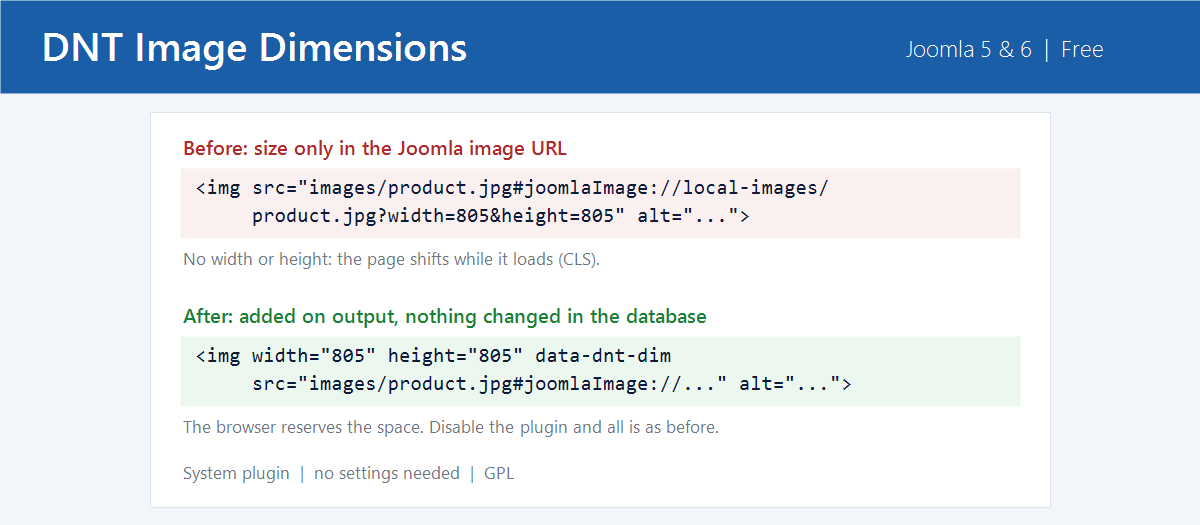
On this site the plugin fixed the product images of two of our own VirtueMart modules (805 × 805 pixels) without a single change to the module code.
What it does not do
- It never overwrites a width or height that is already there. An image with only a fixed height in its style is skipped, because a width attribute would stretch it. Styles like width:100% with height:auto are fine.
- It skips images from other websites and from the media and templates folders. Logos and icons there are often sized by a CSS height only, and a width attribute would stretch them.
- It does not change your database or your articles. Disable the plugin and the output is back to what it was.
- It cannot help images from another website or SVG files. Add width and height to those yourself.
To keep images responsive, the plugin adds one CSS rule to the page head: ":where(img[data-dnt-dim]){height:auto}". Because of :where() the rule has no specificity, so the CSS of your template always wins.
System Requirements
- Joomla 5.x or 6.x
- PHP 8.1 or higher
Installation Guide
- Download the ZIP file with the button above
- In the Joomla administrator, go to System > Install > Extensions and upload the ZIP
- Go to System > Plugins and enable "DNT Image Dimensions"
New versions show up in System > Update > Extensions, like any other Joomla extension.
Released under the GNU General Public License version 2 or later. See the licence.