
VirtueMart Bulk Related Products – Version 1.1.0
✓ Joomla 6✓ VirtueMart 4
Link related products to many VirtueMart products or whole categories in one go, instead of one product at a time. You always see a preview first.
Free download (ZIP)Version 1.1.0, free to use. See the licence.
Tested on Joomla 6.2 with VirtueMart 4
VirtueMart Bulk Related Products is a free administrator component for VirtueMart. In VirtueMart you link related products per product: open the product, search each related product, save, and on to the next. With eight water softeners and six accessories that is 48 searches. This component does it in one run: choose the related products, choose the products or categories that should show them, check the preview and apply.
How does it work?
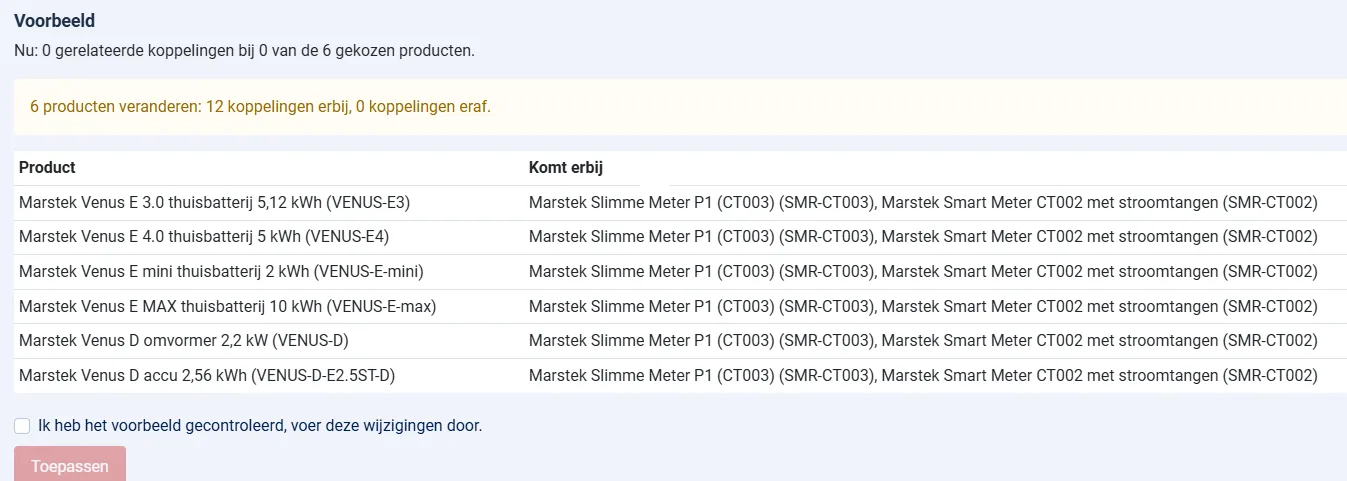
You tick the related products, for example accessories, and then the products or whole categories that should show them. You choose one of three actions. The preview shows per product what will be added and what will be removed, and only after you tick "I have checked the preview" can you press Apply.
- Add: link the related products. Existing links stay and nothing is linked twice.
- Remove: remove only these related products, other links stay.
- Replace: afterwards the products have exactly these related products, all other links are removed.
What is included?
- Tick boxes grouped per category instead of long lists. Tick a category to take all its products, and see your choice at a glance with a cross to remove an item.
- Click a product to see its current links: which related products it has, or where it is already shown as related. A grey number shows how many related products each product has now.
- An overview of all current related products, with a search field and a link to each product in VirtueMart.
- Search by name or SKU. A subcategory only counts when you tick it as well, so you never change more than you meant to.
- A product is never linked to itself.
- Apply only runs when the preview is still valid. If the choices or the products changed in the meantime, nothing happens and you get a new preview.
- Every run is written to a log file in administrator/logs, so you can always see what changed.
- English and Dutch included, automatic updates through the Joomla update system.
Good to know
The component writes the links exactly like VirtueMart does: one custom field row per related product. In the VirtueMart product edit screen they show up as normal related products, and saving the product there keeps them. Child products (variants) are not linked separately, because in VirtueMart they show the related products of their parent.
On a live shop with 490 products we linked 296 related products to 135 products in three runs, after making a backup. Make a backup of your database before a large change; the component has no undo button, but the log tells you exactly what to remove.
Once products have related products, VirtueMart shows its own block Related products on the product page. If you also use VirtueMart Frequently Bought Together, choose how the two blocks work together so visitors do not see the same product twice.
System Requirements
- Joomla 5.x or 6.x (tested on Joomla 6.2)
- VirtueMart 4.x (tested on 4.6), with a custom field of the type Related products
- PHP 8.1 or higher
Installation Guide
- Download the ZIP file with the button above
- In the Joomla administrator, go to System > Install > Extensions and upload the ZIP
- Open Components > VirtueMart Bulk Related Products
- Only users who may manage this component and edit VirtueMart can use it
Frequently asked questions
Does the component change VirtueMart files?
No. It only adds and removes related product rows in the VirtueMart custom field table, the same rows VirtueMart writes itself. It has no tables of its own.
Can I undo a run?
There is no undo button. Run the opposite action (remove after add) with the same choices, or use the log file to see which links were changed. For large changes, make a database backup first.
How many products can I change at once?
Up to 2000 target products per run. For larger shops, run it per category.
Released under the GNU General Public License version 3 or later. See the licence.