
VirtueMart Quick Add – Version 1.0.1
✓ Joomla 6✓ VirtueMart 4
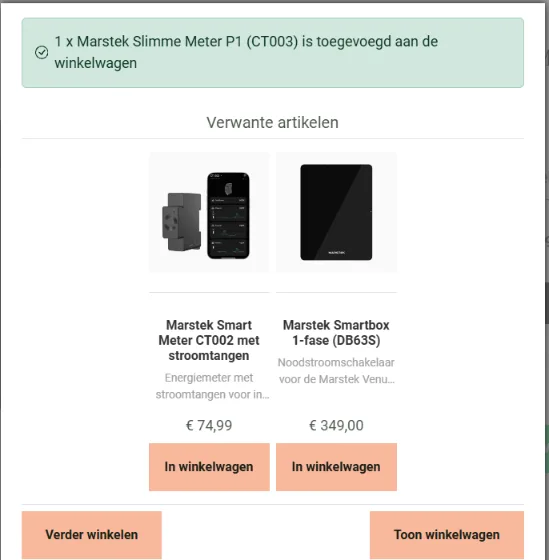
Adds an Add to cart button to the related products in VirtueMart's popup after Add to cart, so customers add an accessory with one click.
Free download (ZIP)Version 1.0.1, free to use. See the licence.
Tested on Joomla 6.2 with VirtueMart 4
VirtueMart Quick Add is a free system plugin for VirtueMart. After Add to cart, VirtueMart shows a popup with related products, but without a button: its own stylesheet hides every button there. A customer who wants the matching care product or accessory has to open its page first. This plugin puts an Add to cart button under the related products that can be ordered straight away. One click, and it is in the cart without leaving the popup.
Which products get a button?
Only products a customer can order without choosing anything. A product with a size, colour or another choice in the cart never gets a button, because adding it without that choice would cause a wrong order. Those products keep the link to their product page.
- Published, and no variants (child products) to choose from.
- No choice field in the cart, also not one inherited from the parent product.
- In stock, when your shop does not allow ordering without stock.
- No minimum order quantity above 1.
What is included?
- Add to cart through VirtueMart's own cart task, with the page's security token.
- The button turns into "✓ Added" and keeps your shop colour; the mini cart is updated.
- Works together with VirtueMart Free Shipping Bar: the bar in the popup moves up after a click.
- Button classes are adjustable, so the button matches your template.
- Optionally also on the Related products block of the product page itself.
- English and Dutch included, automatic updates through the Joomla update system.
Good to know
On a live shop with ten related products, only two got a button: the others have a size or a choice between two volumes. That is on purpose. If you want a button for such a product, sell the variants as separate products without a choice field.
The plugin only adds a button and uses VirtueMart's own cart, so prices, stock and shipping work exactly as with the normal Add to cart button.
System Requirements
- Joomla 5.x or 6.x (tested on Joomla 6.2)
- VirtueMart 4.x (tested on 4.8) with the Add to cart popup and related products
- PHP 8.1 or higher
Installation Guide
- Download the ZIP file with the button above
- In the Joomla administrator, go to System > Install > Extensions and upload the ZIP
- Go to System > Plugins, open "System - VirtueMart Quick Add" and enable it
- Add a product to the cart in your shop and check the related products in the popup
Frequently asked questions
Why does a related product not get a button?
It has a size, colour or other choice, variants, no stock or a minimum order quantity. The customer has to choose on the product page first.
Does it change VirtueMart files?
No. It adds a small script to the page and uses VirtueMart's own cart. Disable the plugin and the popup is exactly as before.
Does it work with my template?
It looks for VirtueMart's standard markup of related products. The button classes can be changed to match your template.
Released under the GNU General Public License version 3 or later. See the licence.