
VirtueMart Dashboard – Version 1.0.1
✓ Joomla 6✓ VirtueMart 4
Puts your latest orders, your most viewed products and buttons to your VirtueMart extensions on the VirtueMart control panel.
Free download (ZIP)Version 1.0.1, free to use. See the licence.
Tested on Joomla 6.2 with VirtueMart 4.8
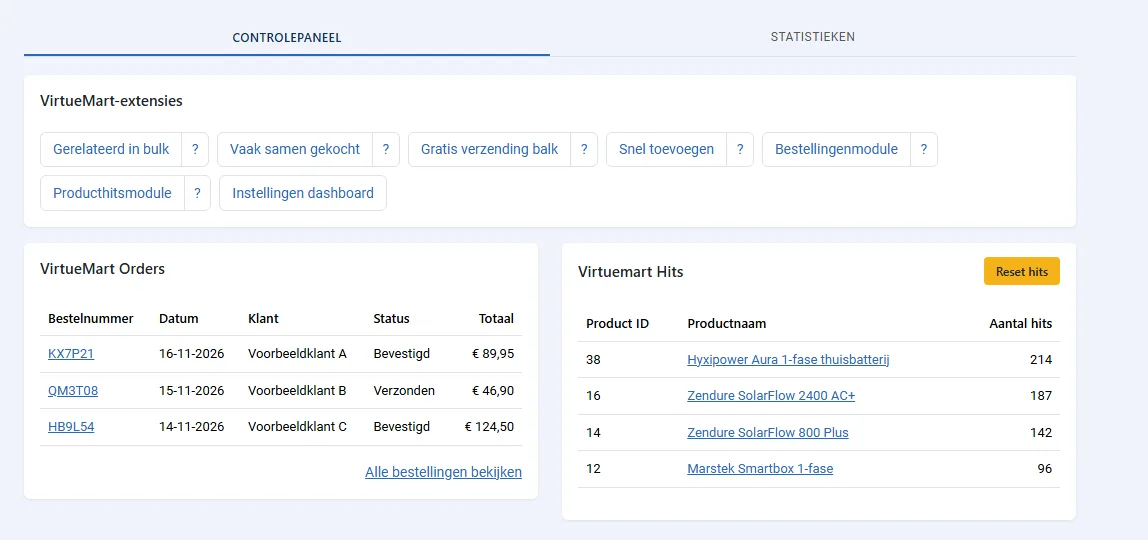
VirtueMart Dashboard is a free system plugin for the VirtueMart control panel. That page shows a chart and a list of news from virtuemart.net, but nothing about your own shop. The plugin adds a row of buttons to the settings of your VirtueMart extensions, and shows the admin modules VM Orders and VirtueMart Product Hits side by side, right below the chart. You see your latest orders and best viewed products the moment you open VirtueMart.
What does it show?
Only what is installed in your shop. A button for an extension you do not have never appears.
- Buttons to Bulk Related Products, Frequently Bought Together, Free Shipping Bar, Quick Add, VM Orders and Product Hits, each with a "?" to its manual.
- The VM Orders and Product Hits modules, when they are published in an administrator position.
- Optionally: the news and extension list of virtuemart.net hidden.
What is included?
- Switched on right after installation, with a message and a link to the settings.
- Three switches: show modules, show extension buttons, hide VirtueMart news (off by default).
- A button opens the settings of that extension straight away when it has one instance, otherwise the filtered list.
- Respects user rights: a manager without access to modules or plugins does not get those buttons.
- English and Dutch included, automatic updates through the Joomla update system.
Good to know
VirtueMart's control panel has no module positions, so the plugin adds its block to the page output, right below the chart. It changes no VirtueMart files. Switch the plugin off and the control panel is exactly as before.
The VirtueMart news sometimes contains security updates. If you hide it, check virtuemart.net yourself now and then.
We use it in three live VirtueMart shops on Joomla 6.2, together with our other VirtueMart extensions.
System Requirements
- Joomla 5.x or 6.x (tested on Joomla 6.2)
- VirtueMart 4.x (tested on 4.8)
- PHP 8.1 or higher
Installation Guide
- Download the ZIP file with the button above
- In the Joomla administrator, go to System > Install > Extensions and upload the ZIP
- Open Components > VirtueMart: the block is on the control panel
- Settings: System > Plugins, "System - VirtueMart Dashboard"
Frequently asked questions
Do I need VM Orders and Product Hits?
No. Without them the plugin only shows the buttons to the extensions you have. Both modules are free as well.
Does it change VirtueMart files?
No. It adds a block to the page when the control panel is opened. Disable the plugin and the control panel is exactly as before.
Where does the block appear?
Right below the VirtueMart chart. If the chart is not on the page, the block goes to the top of the control panel.
Released under the GNU General Public License version 3 or later. See the licence.