
VirtueMart Free Shipping Bar – Version 1.1.2
✓ Joomla 6✓ VirtueMart 4
Shows your customers how much more they need to order for free shipping, with a progress bar in the cart and right after Add to cart.
Free download (ZIP)Version 1.1.2, free to use. See the licence.
Tested on Joomla 6.2 with VirtueMart 4
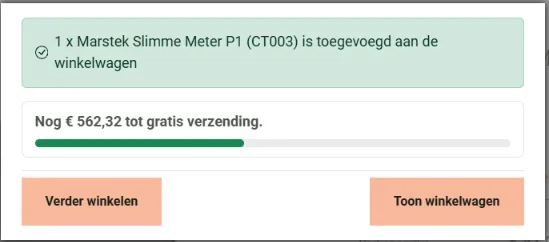
VirtueMart Free Shipping Bar is a free site module for VirtueMart. When a customer adds a product, the module tells them how much is still missing for free shipping, for example "Add € 27.05 more for free shipping", with a bar that fills up. Once the amount is reached, the customer sees once that the order ships for free. A customer who is almost there often adds one more item, and that is exactly the moment this message appears.
How does it work?
The module reads the free shipping amount from your VirtueMart shipment methods: the field Free shipping amount, or a method that costs nothing from a minimum order amount. You do not have to enter the amount twice, and the bar always matches what the customer really pays at checkout. It compares the amount with the total of the products including tax, exactly as VirtueMart does.
- In the VirtueMart popup after Add to cart: the bar appears inside the popup, right below "added to the cart".
- Without a popup: a small notification slides in at the bottom right for six seconds, and at the top on a phone.
- On the cart page: the bar above or below the products, depending on the module position you choose.
What is included?
- The amount is read automatically from the shipment methods (plugin weight_countries), or set by hand in the module.
- Your own texts, with {missing} for the amount still needed and {threshold} for the free shipping amount.
- Choose where the bar is shown: only on the cart page, on all pages, or nowhere (notification only).
- Listens to VirtueMart's own signal after Add to cart, so it works next to VirtueMart's popup and mini cart.
- Shows nothing in a shop without free shipping.
- English and Dutch included, automatic updates through the Joomla update system.
Good to know
Assign the module to all pages: the notification after Add to cart needs that. On pages without a bar the module stays empty, so no empty title box appears. If free shipping only applies to some countries, change the text, for example "for free shipping within the Netherlands and Belgium".
We use it on a live shop with free shipping from € 75 in the Netherlands and Belgium, together with VirtueMart Quick Add: a click on a related product in the popup updates the bar straight away.
System Requirements
- Joomla 5.x or 6.x (tested on Joomla 6.2)
- VirtueMart 4.x (tested on 4.8), shipment plugin weight_countries for the automatic amount
- PHP 8.1 or higher
Installation Guide
- Download the ZIP file with the button above
- In the Joomla administrator, go to System > Install > Extensions and upload the ZIP
- Go to Content > Site Modules > New and choose "VirtueMart Free Shipping Bar"
- Pick a position that is visible on the cart page, turn Show Title off, assign the module to all pages and publish
Frequently asked questions
Where does the module get the free shipping amount?
From your VirtueMart shipment methods, the same setting VirtueMart uses at checkout. You can also enter an amount in the module yourself.
Does the notification show up all the time?
Only after Add to cart, for six seconds. Once free shipping is reached it shows that once, and after that it stays away.
Does it work without the VirtueMart popup?
Yes. Without a popup the module shows a small notification at the bottom right, or at the top on a phone.
Released under the GNU General Public License version 3 or later. See the licence.